
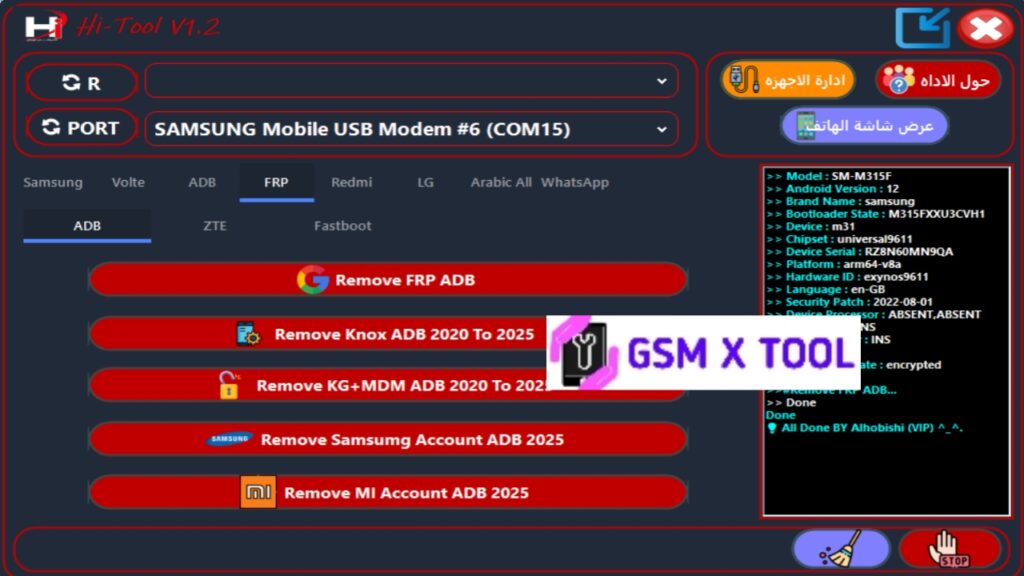
The Hi Tool V1.2 is a professional-grade Android servicing software that has become a must-have for technicians and advanced users looking for efficient solutions to repair, flash, and unlock smartphones. With its 2025 latest update, the tool delivers enhanced performance, stability, and expanded chipset compatibility.
In this article, we’ll explore everything about Hi Tool V1.2, including its key features, installation process, and how to download it safely for free.
What Is Hi Tool V1.2?
Hi Tool V1.2 is a multi-functional Android repair tool designed to perform complex smartphone software operations such as firmware flashing, FRP bypass, IMEI repair, unlocking, and system fixing. It supports all major chipsets, including Qualcomm, MediaTek (MTK), and Unisoc (SPD), and is optimized for both beginners and professional mobile engineers.
The 2025 version of Hi Tool V1.2 comes with several updates that make the process faster, more reliable, and compatible with the latest Android models and versions (up to Android 14).
Key Features of Hi Tool V1.2
1. Flash Firmware Easily
Hi Tool V1.2 allows users to flash official stock ROMs on various Android smartphones with precision.
- Supports Qualcomm, MTK, and SPD firmware flashing.
- Auto-detects scatter or XML-based firmware files.
- Option to erase, format, or update firmware.
- Compatible with both custom and stock ROMs.
2. IMEI Repair and Backup
Hi Tool V1.2 provides a secure and reliable method to restore lost or corrupted IMEI numbers after flashing.
- IMEI write and repair support for all chipsets.
- Dual IMEI restoration for dual-SIM devices.
- Includes NV data backup and restore feature.
- Complies with local IMEI regulations and checksum rules.
3. FRP (Factory Reset Protection) Bypass
Hi Tool V1.2 enables one-click FRP bypass for all major Android brands, including Samsung, Xiaomi, Oppo, Vivo, and Realme.
- Works on Android 5.0 to Android 14.
- Supports EDL, Fastboot, and Meta modes.
- Non-destructive and safe FRP unlock process.
- Automatic device detection for faster operation.
4. Unlock Bootloader and SIM Lock
With Hi Tool V1.2, you can easily unlock your phone’s bootloader or SIM restrictions.
- One-click bootloader unlock/relock.
- Supports carrier/SIM unlocking for multiple brands.
- Safe and reversible unlocking process.
5. Backup and Restore Function
Hi Tool V1.2 ensures that you never lose important data during any repair operation.
- EFS, NVRAM, and full data backup.
- Restore original firmware configuration safely.
- Partition-based backup options.
6. Repair and Maintenance Tools
Hi Tool V1.2 also includes advanced diagnostic and repair functions that can fix software-related issues like:
- Bootloop and stuck logo issues.
- No network and baseband errors.
- MDM, demo mode, and test mode removal.
- Complete system optimization tools.
Supported Chipsets and Devices
Hi Tool V1.2 supports a broad range of devices and chipsets, making it one of the most universal Android tools available today.
Supported Chipsets:
- Qualcomm Snapdragon
- MediaTek (MTK) Helio & Dimensity Series
- Unisoc / Spreadtrum (SPD)
Supported Brands:
- Samsung
- Xiaomi / Redmi / POCO
- Vivo / iQOO
- Oppo / Realme
- Infinix / Tecno / Itel
- Nokia / Lenovo / Motorola
- Huawei / Honor
- Micromax / Lava / Karbonn
How to Install Hi Tool V1.2 on Windows
Follow these steps carefully to install and use Hi Tool V1.2 successfully:
- Download the latest version of Hi Tool V1.2 from a trusted source.
- Extract the ZIP file using WinRAR or 7-Zip.
- Install all required USB drivers (MTK, Qualcomm, SPD).
- Open the Hi_Tool_V1.2_Setup.exe file as Administrator.
- Follow the on-screen setup instructions.
- After installation, launch the tool and wait for activation.
- Connect your device using a USB cable
- Select the function you need (Flash, FRP, IMEI, Unlock).
What’s New in Hi Tool V1.2 (2025 Update)
- Added support for Android 14 and new chipsets.
- Enhanced FRP Bypass and IMEI Repair algorithms.
- Improved Qualcomm EDL flashing performance.
- Added auto-driver detection and installation feature.
- Optimized user interface for faster workflow.
- Fixed minor bugs and improved tool stability on Windows 11.
Hi Tool V1.2 Latest Version Free Download (Official)
You can download the Hi Tool V1.2 Latest Version (2025) from verified service tool repositories or trusted software websites. Always use authentic sources to ensure safety and functionality.