
UMT Support Access Tool 2.1 Latest Version
In 2025, the UMT Support Access Tool 2.1 Latest Version has become one of the most reliable and advanced service utilities for mobile technicians and GSM repair specialists worldwide. This latest release delivers enhanced performance, improved stability, and full compatibility with the latest smartphones. Whether you’re managing IMEI repair, FRP removal, or device flashing, UMT Support Access Tool v2.1 offers the complete package for all professional service requirements.
Table of Contents
What is UMT Support Access Tool 2.1?
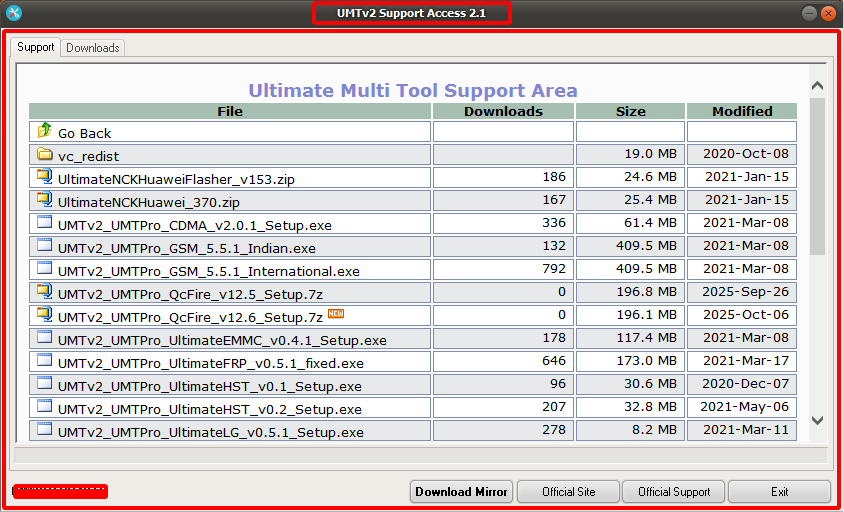
UMT Support Access Tool 2.1 Latest Version is an official Ultimate Multi Tool (UMT) utility designed to help registered users download, activate, and manage all available UMT modules and updates easily. It acts as a gateway to UMT Support Area, where technicians can access the latest software updates, drivers, firmware files, and utility tools without manual searching.
This tool simplifies user access and ensures the UMT Box or Dongle remains up-to-date with the latest functions and features released by the UMT Team.
Key Features of UMT Support Access Tool 2.1 (2025)
UMT Support Access Tool v2.1 Latest Version
1. Seamless Account Login Integration
The new version offers enhanced authentication, allowing users to securely log in with their UMT Support Access Tool 2.1 Latest Version. The system automatically verifies activation status and retrieves user privileges directly from the UMT server.
2. Easy Firmware and Tool Downloads
Access to hundreds of firmware packages and software modules is available in just one click. Whether you need QCFire, GSM Tool, UMT MTK, UMT Samsung, or UMT Huawei modules, the download manager makes the process faster and safer.
3. Auto Update Notification System
The tool automatically detects available updates for your modules and notifies you immediately, ensuring you never miss a crucial release.
4. Optimized User Interface
UMT Support Access Tool 2.1 Latest Version brings a cleaner and more modern user interface, making navigation intuitive even for beginners. The dashboard now categorizes tools by chipset and brand, ensuring efficient access.
5. Comprehensive Driver Support
The package includes updated USB, Qualcomm, and MediaTek drivers, ensuring seamless device communication during flashing or unlocking operations.
6. Compatibility and Stability
It supports Windows 7, 8, 10, and 11 (32-bit & 64-bit) systems with improved performance stability and bug fixes over previous versions.
7. Secure File Transfer
All files downloaded via the UMT Support Access Tool 2.1 Latest Version are verified with checksum validation to ensure they are genuine and unmodified.
New Updates in UMT Support Access Tool 2.1 (2025)
- Revamped Support Area Connectivity: Faster and more secure server connection.
- Improved Firmware Listing: Better organized database with model-based filtering.
- Integrated Update Log Viewer: View version history and changelogs directly in the tool.
- Enhanced Security Layer: Prevents unauthorized access and fake dongle logins.
- Automatic Cache Management: Improves loading speed and saves storage space.
- Bug Fixes: Resolved minor glitches and connectivity issues from previous builds.
Supported Modules and Functions
UMT Support Access Tool 2.1 Latest Version grants direct access to all official UMT modules. Below are the most commonly used ones:
- UMT QCFire Tool: For Qualcomm devices (Flashing, IMEI, FRP, Bootloader Unlock).
- UMT MTK Tool: For MediaTek-powered phones (Read/Write Firmware, Unlock, Repair).
- UMT GSM Tool: For general service functions like network unlock and reset.
- UMT Samsung Tool: For flashing and repairing Samsung smartphones.
- UMT Huawei Tool: For servicing Huawei and Honor devices.
- UMT Android Utility Tool: Advanced all-in-one utility for Android repairs.
By centralizing access, the UMT Support Access Tool 2.1 Latest Version saves time and simplifies the workflow for technicians.
System Requirements
UMT Support Access Tool 2.1 Latest Version
- Operating System: Windows ALL
- Processor: Intel Core i3 or higher
- RAM: Minimum 4 GB (8 GB recommended)
- Storage: 500 MB free space
- Internet Connection: Required for activation and updates
- Hardware: UMT Dongle or Box (activated)
How to Download and Install UMT Support Access Tool 2.1
Step 1 – Download the Official Setup File
Visit the official UMT Support Access Tool 2.1 Latest Version area or authorized GSM community forums that share verified download links. Avoid third-party cracked or modified versions, as they may contain malware.
Step 2 – Extract the Package
After downloading, extract the ZIP file using WinRAR or 7-Zip.
Step 3 – Run Setup
Run the installer as Administrator and follow the on-screen instructions. Choose the default installation path unless you wish to specify a custom folder.
Step 4 – Connect Your UMT Dongle
Insert your UMT Dongle or Box into your computer’s USB port before launching the software.
Step 5 – Launch and Login
Open the tool, log in using your registered UMT account credentials, and enjoy full access to all available UMT modules and files.
Troubleshooting Common Issues
Even though UMT Support Access Tool 2.1 is designed for stability, users might encounter minor issues. Here are quick fixes:
- Login Failed: Check your internet connection and ensure your dongle drivers are installed properly.
- Server Not Responding: The UMT server may be under maintenance; try again later.
- Download Error: Clear the cache folder or change your internet connection.
- Tool Not Opening: Run as Administrator or reinstall Microsoft Visual C++ Runtime Libraries.
Why Choose UMT Support Access Tool 2.1
The UMT Team consistently delivers trusted, professional-grade software for mobile repair engineers. With UMT Support Access Tool v2.1, users gain access to:
- Genuine Firmware Files directly from official sources.
- Regular Tool Updates to support new smartphone releases.
- Enhanced Productivity through unified access and automation.
- Strong Security preventing piracy or tool tampering.
For GSM service providers, this tool is not just a utility—it’s a complete ecosystem for professional device servicing.
Final Words
The UMT Support Access Tool 2.1 Latest Version stands out as the most powerful and user-friendly interface for managing UMT software updates and resources. It ensures that technicians stay ahead with every release, reducing downtime and boosting productivity. With its enhanced security, improved UI, and automatic update notifications, UMT Support Access Tool v2.1 is the ultimate companion for every registered UMT user.
Download the UMT Support Access Tool 2.1 Latest Version (2025) from the official UMT server and experience the next generation of service efficiency in mobile repair technology.
UMT Support Access Tool 2.1 Latest Version – Download